Kinemaster Apk Download
Don’t Click That! The Best Safe APK Websites for Android
Discover the top safe apk websites like APKMirror & F-Droid. Install APKs securely, avoid malware, and get region-locked apps safely!


When You Need an App That Google Won’t Give You
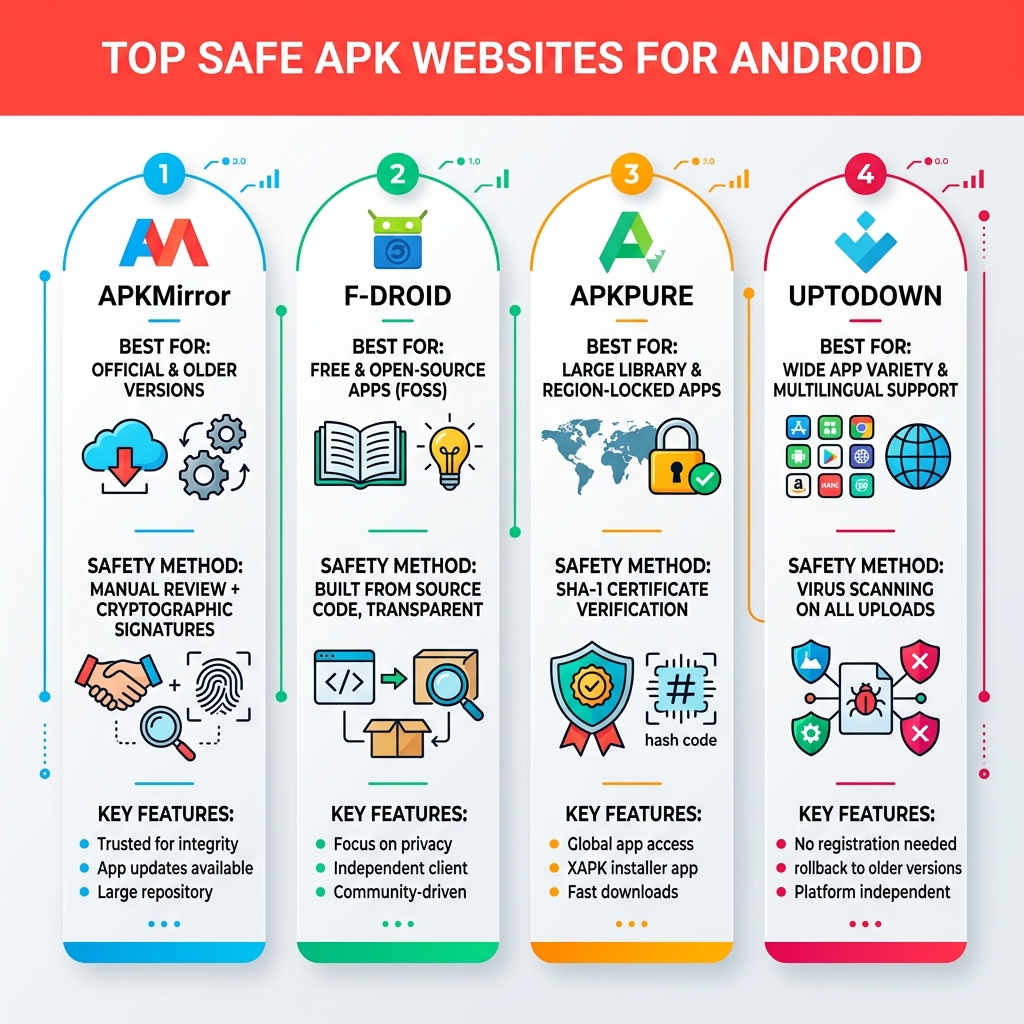
Safe APK websites are third-party platforms that let you download Android apps outside the Google Play Store — without putting your phone at risk. If you’re in a hurry, here are the most trusted ones:
| Website | Best For | Safety Method |
|---|---|---|
| APKMirror | Official app versions & older releases | Manual review + cryptographic signatures |
| F-Droid | Free & open-source apps | Built from source code, fully transparent |
| APKPure | Large library, region-locked apps | SHA-1 certificate verification |
| Uptodown | Wide app variety | Virus scanning on uploads |
These four are the starting point for anyone who wants to sideload apps safely.
So why are so many Android users even looking outside the Play Store in the first place? Maybe an app isn’t available in your country. Maybe a new update broke something you loved. Or maybe you just want to try a video editing tool — like KineMaster — without jumping through hoops.
Whatever the reason, the risk is real. Not every APK site plays by the rules, and a single bad download can expose your device to malware, spyware, or worse.
That’s exactly why knowing which sites to trust matters so much.
I’m Faisal Shahzad, and through my work at KineMaster APK, I’ve spent years navigating safe APK websites to help everyday users find powerful apps without compromising their security. In the sections ahead, I’ll walk you through everything you need to download APKs confidently — from spotting red flags to installing files the right way.
Introduction
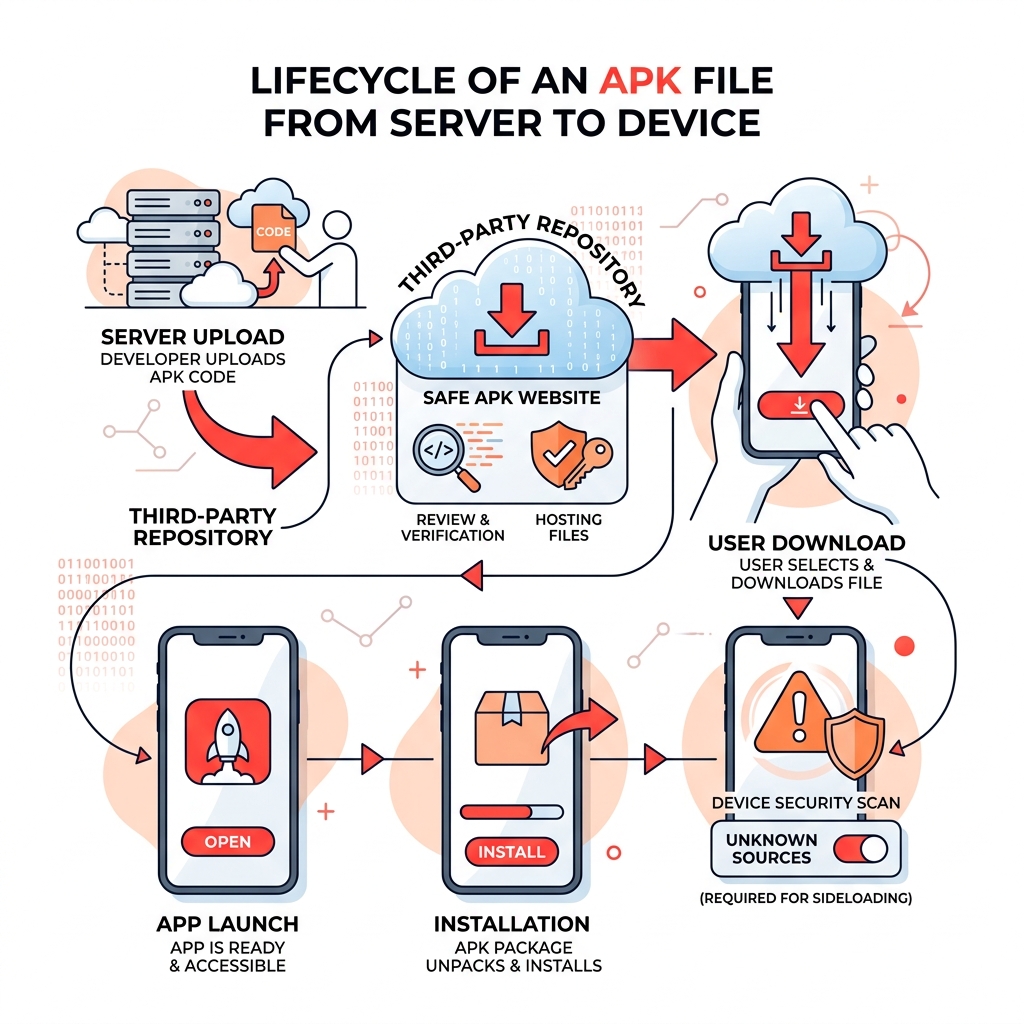
Before we dive into the “where,” let’s talk about the “what.” An APK (Android Package Kit) is essentially the digital box that contains everything an app needs to install on your phone. Think of it like a .exe file on a Windows computer or a .dmg on a Mac. When you download an app from the Google Play Store, the store handles the “unboxing” for you. When you download it yourself from safe apk websites, you are performing what’s known as “sideloading.”
Sideloading is the process of installing an application package in APK format onto an Android device from a source other than the official store. While Google Play is the default home for most of us, it has its limits. It might block apps due to your location, your device’s age, or simply because the developer didn’t want to pay Google’s fees.
Why Users Search for Safe APK Websites
You might wonder why anyone would bother leaving the walled garden of the Play Store. As of 2024, over 2.5 million apps are available on Google Play, but that’s just the tip of the iceberg.
Here are the most common reasons we see users hunting for safe apk websites:
- Region-Locked Content: Some apps are only launched in specific countries. If you’re a fan of a game that’s only out in Japan, an APK is your only ticket to playing it.
- Rolling Back Updates: We’ve all been there—your favorite app updates, and suddenly the interface is terrible or it crashes constantly. Sideloading allows you to find and install the older, stable version.
- Beta Testing: Developers often release early versions of their apps on sites like APKMirror before they hit the general public.
- Legacy Hardware Support: Newer versions of apps often drop support for older Android versions. Finding a legacy APK allows you to keep using your older tablet or phone.
- Storage Savings: Since August 2021, Google has moved toward the Android App Bundle (AAB) format. While this saves about 15% of storage space for the end-user, it makes sharing apps directly between devices harder. Many users prefer the traditional APK format for its simplicity and portability.
The Risks of Downloading from Untrusted Sources
We have to be honest: the internet is a bit of a wild west. While there are many safe apk websites, there are ten times as many “dark” sites waiting to trick you.
A 2023 report by Check Point Research revealed an 8% surge in global weekly cyberattacks, marking the most significant increase in two years. This isn’t just a corporate problem; it affects mobile users directly. When you download an APK from an unverified source, you run several risks:
- Malware and Spyware: Malicious code can be injected into a popular app. You think you’re installing a game, but you’re actually installing a keylogger that steals your banking info.
- Counterfeit Applications: A study by the University of Sydney found over 2,000 counterfeit apps on third-party sites that perfectly mimicked popular apps but contained hidden malware.
- Disproportionate Risk: Research shows that while alternative sources account for only 5.7% of app installs, they are linked to over 10% of unwanted apps.
- Background Resource Draining: Some “free” apps are actually cryptominers that use your phone’s processor in the background, draining your battery and slowing your device to a crawl.
Top 5 Safe APK Websites for Android Users
To stay safe, you need to stick to the “Big Four” (and one honorable mention). These sites have built reputations over a decade by being transparent and rigorous.
| Feature | APKMirror | APKPure | F-Droid | Uptodown |
|---|---|---|---|---|
| Manual Review | Yes (Strict) | Yes | Yes (Source Code) | Yes |
| Pirated Content | No | No | No | No |
| Modded APKs | No | No | No | No |
| Verification | Cryptographic | SHA-1 | Build from Source | VirusTotal |
APKMirror: The Gold Standard for Safe APK Websites
If there is one site we trust above all others, it’s APKMirror. Operated by the team behind the reputable news site Android Police, APKMirror has the strictest security vetting in the industry.
They manually review every single APK submitted. More importantly, they use cryptographic signatures to verify that the app you are downloading is exactly what the developer intended. If the signature doesn’t match the version on the Play Store, APKMirror won’t host it. This means you will never find pirated or “cracked” apps here—only official, safe files. It is the best place to find historical versions of apps or to bypass region locks for free software.
F-Droid: The Open Source Alternative
F-Droid is different. It doesn’t just host apps; it hosts FOSS (Free and Open Source Software). What makes F-Droid one of the ultimate safe apk websites is their transparency.
Every app on F-Droid is built from its source code by the F-Droid team itself. They check for “anti-features”—like tracking or ads—and warn you before you download. If you are a privacy enthusiast who wants to ensure no “phone home” code is hidden in your apps, F-Droid is your home. You can learn more about their tools on their official about page.
APKPure: A Massive Library of Safe APK Websites
APKPure is likely the most popular alternative to the Play Store. It offers a massive library, including many apps that are region-locked.
APKPure uses a SHA-1 certificate check to ensure that the APK is original and hasn’t been tampered with. One of their best features is support for XAPK files. These are bundles that include the OBB data (extra graphics and sounds) for large games, making them much easier to install than doing it manually. They also have a very active community where you can read user reviews and see security badges on verified apps.
How to Identify and Install APKs Securely
Even when using safe apk websites, you should act like a digital detective. Before you hit that “Install” button, there are a few steps we always recommend to our users at KineMaster APK.
First, check the file size. If you’re downloading a high-end video editor and the file is only 2MB, something is wrong. Real apps have assets, and those assets take up space. Second, look at the permissions. A simple calculator app should never ask for access to your contacts or your microphone.
Spotting Malicious Files on Safe APK Websites
If you’re ever in doubt, use these tools:
- VirusTotal: This is a free service that scans files using over 70 different antivirus engines. Simply upload the APK before you install it.
- Hash Matching: Most safe apk websites provide an MD5 or SHA hash. You can use a hash checker app to ensure the file you downloaded perfectly matches the one on the server.
- Play Protect: Don’t disable Google Play Protect! Even if you sideload an app, Play Protect can still scan it for known threats during the installation process.
- Browser Safety: Using a secure browser can help block malicious redirects. Check out our guide on the Safest Android Browsers for Privacy to learn more.
Step-by-Step Guide to Installing an APK
Ready to install? Here is the safest way to do it:
- Enable Unknown Sources: Go to Settings > Apps > Special App Access > Install Unknown Apps. Select your browser (like Chrome) and toggle “Allow from this source” to on.
- Download and Scan: Download the file from one of the safe apk websites mentioned above. Run it through VirusTotal if you’re nervous.
- Navigate with File Manager: Open your device’s File Manager and go to the “Downloads” folder.
- Install: Tap the APK file. A prompt will appear asking if you want to install. Review the permissions one last time, then tap “Install.”
- Post-Install Cleanup: Once the app is installed, we recommend deleting the APK file to save space. Also, go back into your settings and toggle “Install Unknown Apps” back to off for your browser. This prevents accidental installs in the future.
If you’re looking for a more detailed walkthrough, we have a 2026 Step-by-Step Survival Guide specifically for KineMaster users.
Frequently Asked Questions about APK Safety
Is it legal to download APK files?
Yes, downloading and installing APK files is perfectly legal. Android is an open platform, and “sideloading” is a core feature of the OS. However, downloading pirated (paid apps for free) is illegal and is the primary way malware is spread. Stick to free apps or official versions from safe apk websites.
Does downloading APKs void my device warranty?
No. Sideloading an app is not the same as “rooting” your phone. It is a standard software action and does not affect your hardware warranty. However, if you install a malicious app that causes software issues, your manufacturer might require a factory reset to fix it.
Can APKs downloaded from third parties update automatically?
Generally, no. Apps downloaded from the Play Store update via Google’s servers. If you sideload an app, you usually have to manually download the new version from your chosen safe apk websites to update it. Some platforms, like APKPure and F-Droid, have their own “store” apps that can manage these updates for you.
Conclusion
Navigating the world outside the Google Play Store can feel intimidating, but it doesn’t have to be. By sticking to safe apk websites like APKMirror, F-Droid, and APKPure, you gain access to a world of customization, legacy support, and region-free content without turning your phone into a paperweight.
At KineMaster APK, we believe in giving users the power to create without limits. Whether you’re looking for KineMaster Pro APKPure Download options or exploring the Best KineMaster Mods, safety should always be your first priority.
Remember: check the signatures, scan the files, and never download a paid app from a “shady” link. Your phone—and your data—will thank you.
Ready to start editing like a pro? Download the latest KineMaster Pro and see what you can create!











 Best Kinemaster MODs9 months ago
Kinemaster for Beginners: Your First Video in 15 Minutes (No Experience Needed)

 Kinemaster Black2 years ago
KineMaster Black Download Latest Version v8.5

 Red Kinemaster Download2 years ago
Red Kinemaster Download Apk Latest Version v7.4.11.32428.GP Without Watermark
- Kinemaster Old Version2 years ago
KineMaster Old Versions 7.4.10.32410.GP Without Mark
- Kinemaster Diamond Mod Apk2 years ago
Kinemaster Diamond Mod Apk Download Pro Version V7.4.0.32260.GP
- Kinemaster without watermark2 years ago
Kinemaster without watermark Download Latest Version 4.15.5.17370.GP
- Best Kinemaster MODs11 months ago
kinemaster pro apk download 2025 full unlocked + no watermark kinemaster mod apk
- Kinemaster Blue Apk2 years ago
Kinemaster Blue Apk Download Without Watermark | Latest Version]