
Blog
The Ultimate Guide to System App Safe Remover Pro APK
Master System App Safe Remover Pro APK: Safely remove bloatware, optimize Android performance, and manage apps with root access. Pro guide inside!

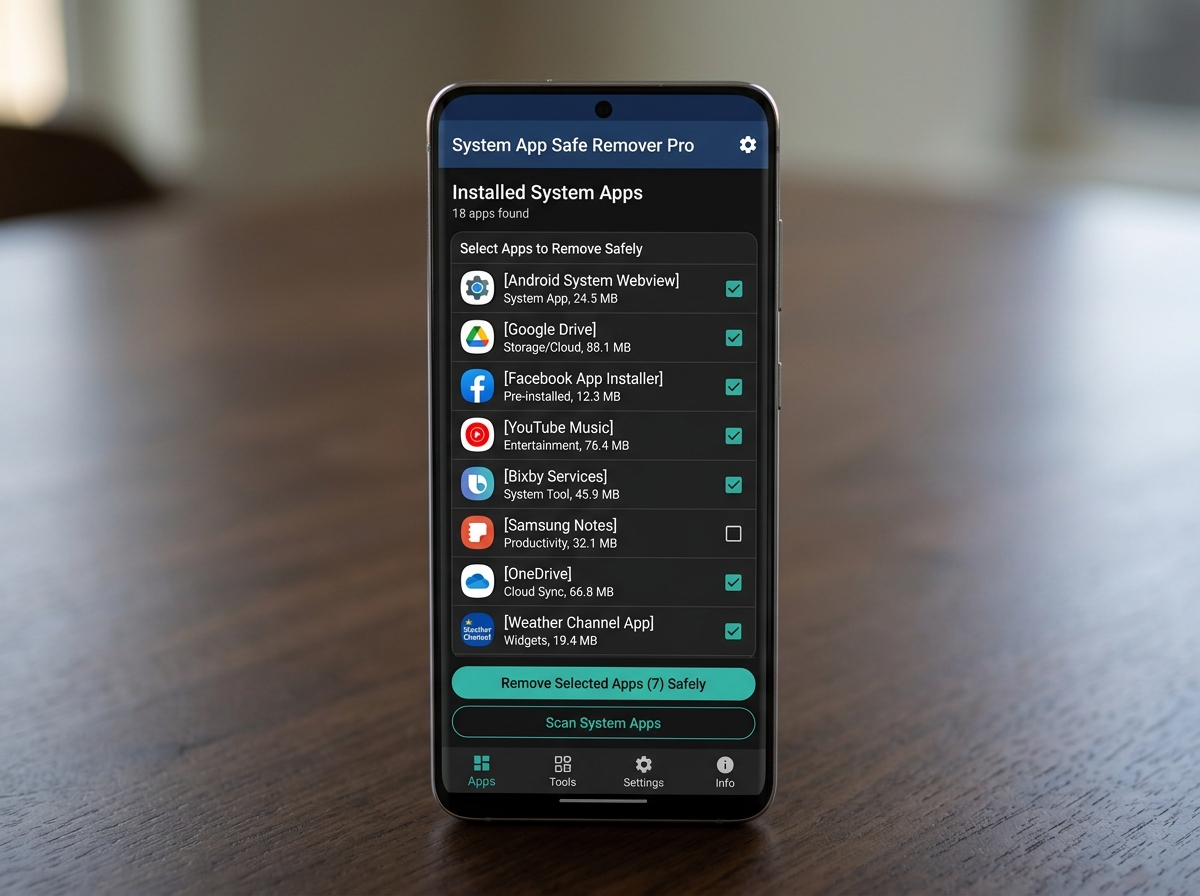
Why System App Safe Remover Pro APK Is the Go-To Tool for Removing Android Bloatware
System App Safe Remover Pro APK is a paid Android utility that lets you uninstall pre-installed system apps (bloatware) on rooted devices — freeing up storage, improving speed, and cleaning up your device.
Quick answer for what it does:
- Removes unwanted system apps with root access
- Classifies apps as Could remove, Should keep, or Key module so you know what’s safe to delete
- Automatically backs up uninstalled apps to a Recycle Bin for easy recovery
- Manages user apps, moves apps to SD card, and scans for APK files
- Available on Google Play for $1.99 with no ads
Most Android phones ship with dozens — sometimes hundreds — of apps you never asked for and can’t normally delete. These apps eat storage, drain battery, and slow your device down. One real user reported removing over 100 system apps from a rooted Samsung S20 Ultra and seeing noticeable improvements in speed, battery life, and cooling.
That’s exactly the problem System App Safe Remover Pro APK is built to solve.
I’m Faisal Shahzad, and I’ve spent years testing and reviewing Android utility APKs — including system app safe remover pro apk — to help everyday users get more out of their devices. Let’s walk through everything you need to know to use it safely and effectively.
What is System App Safe Remover Pro APK?
Developed by Jumobile, this application is a specialized system management tool designed to tackle one of Android’s biggest annoyances: bloatware. While standard Android settings allow you to “disable” some apps, they still occupy precious internal storage. System app safe remover pro apk goes a step further by actually deleting these files from the system partition.
The “Pro” version is the premium, paid iteration of the app. While there is a free version available that contains ads, the Pro version offers a completely ad-free experience. This is crucial for a system-level utility where you want a clean, focused interface without accidental clicks on banners.
Beyond just deleting apps, it is a highly memory-efficient utility. It is designed to be small (often under 3 MB) and is programmed to release all occupied memory the moment you exit the app. This ensures that the tool helping you speed up your phone doesn’t become the thing slowing it down. Whether you are dealing with a modern flagship or an older device, this Android utility provides the administrative leverage needed to reclaim your hardware.
Key Features for Advanced Device Management

The strength of system app safe remover pro apk lies in its organization. It doesn’t just give you a raw list of filenames; it categorizes every piece of software on your phone.
- Batch Uninstallation: Instead of clicking “uninstall” fifty times, you can select dozens of apps at once and remove them in a single command.
- Recycle Bin: This is perhaps the most important safety feature. When you “uninstall” a system app, the tool actually moves it to a hidden directory. If your phone starts acting weird, you can go to the Recycle Bin and restore the app instantly.
- User App Management: It’s not just for system apps. You can manage your regular apps, back them up, or perform batch uninstalls of games and tools you no longer need.
Safety Levels Comparison
To help you decide what to delete, the app uses a smart filtering system based on testing across hundreds of different devices.
| Safety Level | Description | Action Recommended |
|---|---|---|
| [Could remove] | Non-essential apps like pre-installed trials, news apps, or redundant browsers. | Safe to uninstall. |
| [Should keep] | Apps that provide basic functionality (e.g., a specific manufacturer gallery). | Remove only if you have a replacement. |
| [Key module] | Critical system processes, boot files, and core frameworks. | Do not remove. May cause boot loops. |
Managing APKs with System App Safe Remover Pro APK
Many of us keep a “Downloads” folder full of APK files we’ve installed over time. This app includes a built-in APK manager that scans your SD card and internal storage. It can detect duplicate APKs (saving space), allow for batch renaming, and let you install or delete files without navigating through a clunky file manager. It provides a bird’s-eye view of every installer file on your device.
Moving Apps to External Storage
If your internal phone storage is crying for help, the app’s “Move to SD Card” feature is a lifesaver. While Android has some native support for this, it is often restricted by manufacturers. This tool allows for a “one-click move” for multiple applications, optimizing your storage layout and ensuring your high-speed internal memory is reserved for the most demanding tasks.
How to Safely Remove System Apps
Safety is the primary concern when messing with the system partition. A single wrong deletion can result in a “brick” or a “boot loop” (where the phone refuses to start). System app safe remover pro apk mitigates this risk through stability filtering. The developers have tested the app on hundreds of devices to identify which apps are safe to remove and which are tied to the phone’s core stability.
However, it is important to remember that manufacturers like Samsung, Xiaomi, and Huawei customize Android heavily. What is safe to remove on one might be critical on another. This is why we always recommend checking the System App Remover Pro APK (Paid/Full Version) v10.1.13540 details and ensuring you have a current backup of your data.
Safety Classifications in System App Safe Remover Pro APK
The app uses a traffic-light style risk assessment:
- [Could remove]: Usually highlighted in green. These are safe bets.
- [Should keep]: Often highlighted in orange. These require caution.
- [Key module]: Highlighted in red. These are the “danger zone” apps.
Step-by-Step Guide to System App Safe Remover Pro APK
- Grant Root Permission: Upon first launch, your root manager (like Magisk or SuperSU) will ask to grant the app administrative rights. You must accept this to modify system files.
- Select Your Apps: Navigate to the “System App” section. Use the filters to look at the “Could remove” list first.
- Perform Batch Uninstall: Check the boxes for the apps you want to disappear. Tap the “Uninstall” button.
- The Reboot Procedure: After removing a batch of system apps, we highly recommend rebooting your device. This allows the Android OS to reconfigure itself without those background processes running.
For those looking to manage other types of APKs, such as video editors, you might want to check out our guide on How to Install KineMaster APK Safely: Your 2026 Step-by-Step Survival Guide to ensure your other installations are just as secure.
Root Requirements and Technical Specifications
It is a common question: “Can I use this without root?” The short answer for system apps is no.
Android’s security model prevents any standard app from touching the /system partition. To delete bloatware, you need root access. While some tools use “ADB Shell” commands to hide apps without root, system app safe remover pro apk is designed for the deep cleaning that only root allows.
Technical Details:
- Compatibility: Supports Android versions as old as 2.3 (Gingerbread) all the way up to modern API levels.
- Size: Extremely lightweight at approximately 2 MB to 3 MB.
- Rooting Guide Help: While the app doesn’t root the phone for you, it often provides links and guidance for users who are new to the rooting process.
Frequently Asked Questions about System App Removal
Does System App Remover Pro require root access?
Yes, for its primary purpose of uninstalling system applications, root permission is mandatory. Without root, the app cannot access the system partition to delete the files. For non-rooted users, the app can still manage user apps and move files to the SD card, but the “System App” tab will be limited.
Is it 100% safe to uninstall any system app?
No app can honestly claim 100% safety because every manufacturer (Samsung, Google, OnePlus) uses different “Key modules.” However, this tool is among the safest because of its stability filtering and the “Recycle Bin” feature. If you stick to the “Could remove” category, your risk is very low.
How do I restore an app I accidentally deleted?
If you realize a feature (like your camera or Wi-Fi) stopped working after a deletion, open the app and go to the Recycle Bin. Select the app you recently removed and hit “Restore.” The app will move the files back to the system partition, and after a reboot, everything should return to normal.
Conclusion
At KineMaster APK, we know that a fast, clean device is the foundation for a great mobile experience—whether you’re editing high-definition video or just browsing the web. Using system app safe remover pro apk is a professional-grade way to reclaim your phone from manufacturer bloatware. By following the safety classifications and keeping your root permissions in check, you can transform a sluggish device into a high-performance machine.
Once your device is optimized and running smoothly, why not put that extra processing power to use? You can download the latest professional video editing tools at https://kinemasterappk.com/ and start creating content without the lag or storage worries that bloatware causes. Happy cleaning!













 Best Kinemaster MODs9 months ago
Kinemaster for Beginners: Your First Video in 15 Minutes (No Experience Needed)

 Kinemaster Black2 years ago
KineMaster Black Download Latest Version v8.5

 Red Kinemaster Download2 years ago
Red Kinemaster Download Apk Latest Version v7.4.11.32428.GP Without Watermark
- Kinemaster Old Version2 years ago
KineMaster Old Versions 7.4.10.32410.GP Without Mark
- Kinemaster Diamond Mod Apk2 years ago
Kinemaster Diamond Mod Apk Download Pro Version V7.4.0.32260.GP
- Kinemaster without watermark2 years ago
Kinemaster without watermark Download Latest Version 4.15.5.17370.GP
- Best Kinemaster MODs11 months ago
kinemaster pro apk download 2025 full unlocked + no watermark kinemaster mod apk
- Kinemaster Blue Apk2 years ago
Kinemaster Blue Apk Download Without Watermark | Latest Version]







